Sharp Printer Support: MFP Drivers, Sharpdesk Mobile and Android Printing (Independent Guide)
An independent guide to Sharp printer support: where the MFP drivers actually download, Sharpdesk Mobile, why the Sharp Print Service Plugin is obsolete in Europe, and the recurring MFP problems.
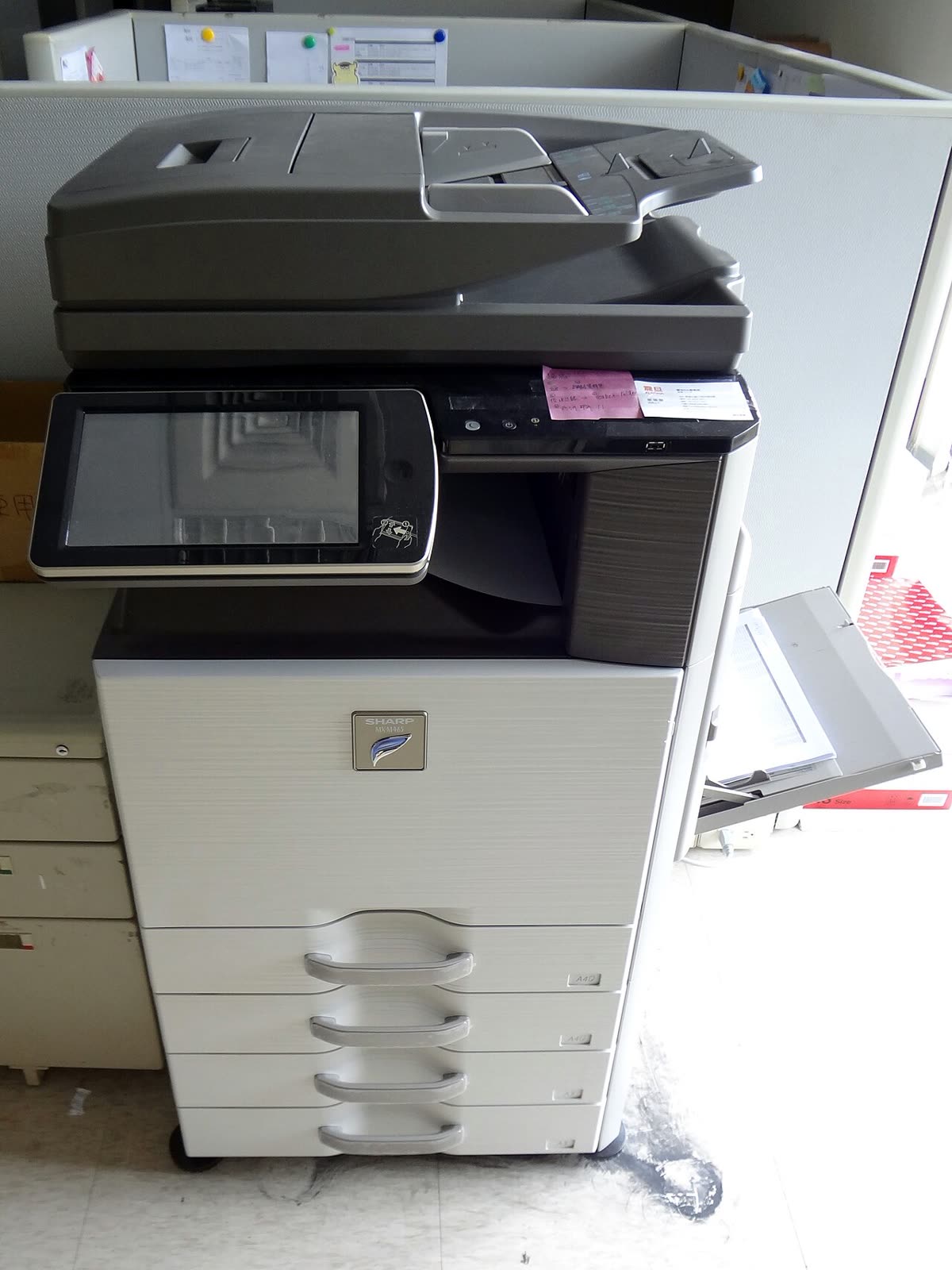
Sharp is two companies wearing one badge. There is the consumer electronics brand most people know, and there is Sharp's business imaging division, which builds the MFP sitting in an office corridor. They have separate websites, separate support structures and separate contact routes, which is the single biggest reason people struggle to find Sharp printer support at all.
This page is an independent map of the business side: where drivers actually download, which apps are current and which are being retired, how setup runs, what the recurring faults are, and how the dealer model changes who you call.
Official Sharp support links
Start on the business side of Sharp, not the consumer side. The two are effectively separate organisations from a support perspective.
| Purpose | Address | Notes |
|---|---|---|
| Drivers and downloads (North America) | business.sharpusa.com/product-downloads | Search by exact model and operating system |
| Business imaging (North America) | business.sharpusa.com | Products, dealers and support |
| Global and other regions | global.sharp | Region selector leading to national business sites |
Sharp software: current and retired
Sharpdesk Mobile
Sharpdesk Mobile is the current mobile application for iOS and Android. Its most valuable function is scanning from the MFP directly to the phone, which standards-based printing protocols do not provide. It also prints documents held on the phone and browses files stored on supported devices. See our Sharpdesk Mobile page.
Sharp Print Service Plugin (obsolete in Europe)
The Print Service Plugin was Sharp's own Android print connector, from the period before Mopria became a universal standard. It is now marked obsolete in Europe, and Sharp directs Android users to Mopria Print Service instead. Mopria handles Sharp MFPs correctly, including duplex and tray selection, and is maintained across the industry rather than by one vendor. Our Mopria Print Service page covers what it does.
Print drivers
Sharp supplies PCL6 and PostScript drivers per model family from its business download site, exposing the full MFP feature set including finishing, stapling, account codes and confidential print with a PIN release at the panel. A generic class driver will print but will silently drop those features, which is why the proper driver matters more on an MFP than on a home printer.
The embedded web page
Every networked Sharp MFP exposes a web interface at its IP address. This is where you set a static address, manage the address book, configure scan destinations, read counters and apply security policy. For an administrator it is the most useful tool available.
Setting up a Sharp MFP
- Remove all packing material, seat the toner cartridges, and load paper with the tray guides set to the actual size. Sharp trays report size from the guides and will halt on a mismatch.
- Power on and let the device complete warm-up. Colour MFPs run an image stabilisation cycle that can take several minutes on first start.
- Connect by Ethernet. Sharp business hardware assumes a wired network, and wireless is usually an optional kit rather than a default fitment.
- Where a wireless kit is installed, expect 2.4 GHz support on smaller devices. A merged 2.4/5 GHz network name is the usual reason the device never lists your network.
- Print the configuration list from the panel, note the IPv4 address, and reserve it in your router or DHCP server.
- Open the web interface in a browser at that address and change the default administrator password immediately.
- Deploy the model driver to computers, then configure scan destinations centrally on the device rather than per user.
Sharp model families explained
| Family | What the name signals | Best for |
|---|---|---|
| BP series | Current colour and mono office MFPs | Offices and departments; the mainstream current line |
| MX series | Established colour and mono MFPs, many still installed | Existing estates; drivers and parts remain available |
| AR series (legacy) | Older mono copiers and MFPs | Long-lived machines still in service in smaller offices |
| MX-B mono desktop | Compact mono MFPs for small workgroups | Small offices needing a proper MFP without a floor-standing device |
| Production and light production | Higher volume colour engines | In-house print rooms |
Within a family the number usually reflects engine speed and paper handling rather than a different feature set, so a larger number generally means faster and bigger rather than more capable.
Common Sharp MFP problems
| Problem | What is actually happening |
|---|---|
| Scan to email stopped working | The mail provider withdrew basic authentication; the device login no longer exists |
| Scan to folder fails silently | SMB version, expired credentials or a share with read but not write access - see scanner not working |
| Device offline in Windows | The queue cannot reach the device IP after a DHCP change - see printer offline |
| Misfeed at a named location | The panel diagram shows which door to open; pulling paper backwards causes damage - see paper jam |
| Android cannot find the printer | The obsolete Print Service Plugin rather than Mopria is installed |
| Finishing options missing in the driver | A generic class driver is installed instead of the Sharp model driver |
Codes across every brand are indexed in our error code directory.
Consumables and the dealer model
Sharp MFP consumables include toner, drums, developer, waste toner containers and fusers, each with its own yield. As with other office brands, the practical answer to that complexity is the click-charge agreement, where a dealer supplies toner and service for a rate per printed page.
That agreement also determines your supply freedom. On a contract device, toner arrives automatically and fitting third-party cartridges is a breach that can void service cover. On an outright purchase you have normal freedom, subject to chip recognition. Because Sharp business devices are overwhelmingly dealer-placed, check the paperwork first.
Fixing scan to email properly
This deserves its own section because it is the most common Sharp MFP complaint and the most commonly misdiagnosed. The device has not broken. What changed is that mail providers withdrew basic authentication, the simple username and password login that MFPs have used for two decades. Modern mail services expect a token-based sign-in that a copier controller written years ago cannot perform.
There are three workable answers. The first is an authenticated relay: a small mail relay inside your network that accepts the device's simple login and forwards the message using modern authentication to your provider. This keeps the workflow users are familiar with. The second is to switch to scan to folder, pointing the device at a network share and letting people collect scans from there, which removes the mail dependency entirely. The third, on newer i-Series-era controllers, is a firmware level that supports modern authentication directly, which is worth asking your dealer about before building anything.
What does not work is repeatedly re-entering the password, rebooting the device, or having a user create an app-specific password on their personal account. That last one appears to work and quietly puts one employee's mailbox credentials inside a shared office device, which is a security problem rather than a fix.
Firmware, security and warranty
Firmware is applied through the web interface or by the dealer, often remotely on managed devices. Sharp MFPs store address books, scan destinations, mail credentials and, on larger models, documents on an internal drive, so firmware currency and end-of-life data handling are security matters.
Warranty applies to outright purchases and is registered regionally. On dealer-placed devices the agreement replaces it entirely and defines response times, parts and consumables.
How this site fits
We are independent and not affiliated with Sharp. We publish vendor-neutral fixes, link to Sharp's own pages for anything that must come from Sharp, and never charge to unlock a fix. Everything we have on this brand is collected on the Sharp brand hub.
Sharp software and drivers
Sharp error codes
Sharp printer models
Grouped by series. Every model page has setup steps, the right cartridge or toner numbers, driver links and the faults owners report.
BP-50C A3 colour MFP 5
BP-50M A3 mono MFP 2
BP-70C premium A3 colour MFP 2
MX A3 colour MFP 2
AR entry A3 mono copier 1
AR legacy A3 mono copier 1
BP desktop A4 colour MFP 1
BP-20 entry A3 colour MFP 1
BP-30C entry A3 colour MFP 1
BP-30M entry A3 mono MFP 1
MX-B desktop A4 mono MFP 1
MX-C desktop A4 colour MFP 1
MX-M A3 mono MFP 1
No model matches that. Try the model number only, e.g. "2800".
Sharp support FAQ
Where do I download Sharp printer drivers?
In North America, from business.sharpusa.com/product-downloads, which is the business product download hub. Elsewhere, from the Sharp regional business site reached through global.sharp. Search your exact model number and choose your operating system. Sharp separates its consumer electronics site from its business imaging site, which is why a general search for Sharp support often lands you on the wrong part of the company.
Is the Sharp Print Service Plugin still supported?
It is marked obsolete in Europe, and Sharp directs users to Mopria Print Service instead. The plugin was Sharp's own Android print connector from an era before Mopria became universal. On any current Android phone, Mopria Print Service handles Sharp MFPs perfectly well, including duplex and tray selection, and it is maintained across the whole industry rather than by one manufacturer.
What is Sharpdesk Mobile?
It is Sharp's mobile application for iOS and Android. It lets you print documents stored on the phone to a Sharp MFP, scan from the MFP directly to the phone, and browse documents held on the device. It is genuinely useful for the scan-to-phone direction, which standards-based printing does not cover. For simple printing, Mopria or AirPrint is usually simpler.
How do I contact Sharp support in the UK?
If a dealer placed your MFP or you hold a managed print agreement, contact that dealer, because they hold the service obligation and Sharp will route you back to them. For outright purchases, use the support options on the Sharp business site for your region. We do not publish phone numbers because they change and because Sharp's business and consumer divisions are contacted separately.
Why has scan to email stopped working on my Sharp MFP?
Almost certainly because your email provider withdrew basic authentication. MFPs sign in to a mail server with a stored username and password, and major providers have disabled that login method for security reasons. The device is working perfectly; the login it uses no longer exists. The fix is either an authenticated relay the device can use, or moving to scan to folder instead.
Can I use compatible toner in a Sharp MFP?
On an outright-purchased device, sometimes, though Sharp uses chipped cartridges and supply reporting will be unreliable. On a managed print or click-charge agreement, toner is supplied under the contract and fitting third-party toner is a breach that can void your service cover. Since most Sharp MFPs are placed on such agreements, check the paperwork before buying anything.
Let a printer specialist fix it with you, remotely
Share your screen, we diagnose the driver, Wi-Fi or firmware problem and fix it while you watch. One affordable annual plan covers every printer in your home or office.