Brother · HL-2200 mono laser
Brother HL-2280DW
Home offices that want a tiny laser copier with bargain supplies
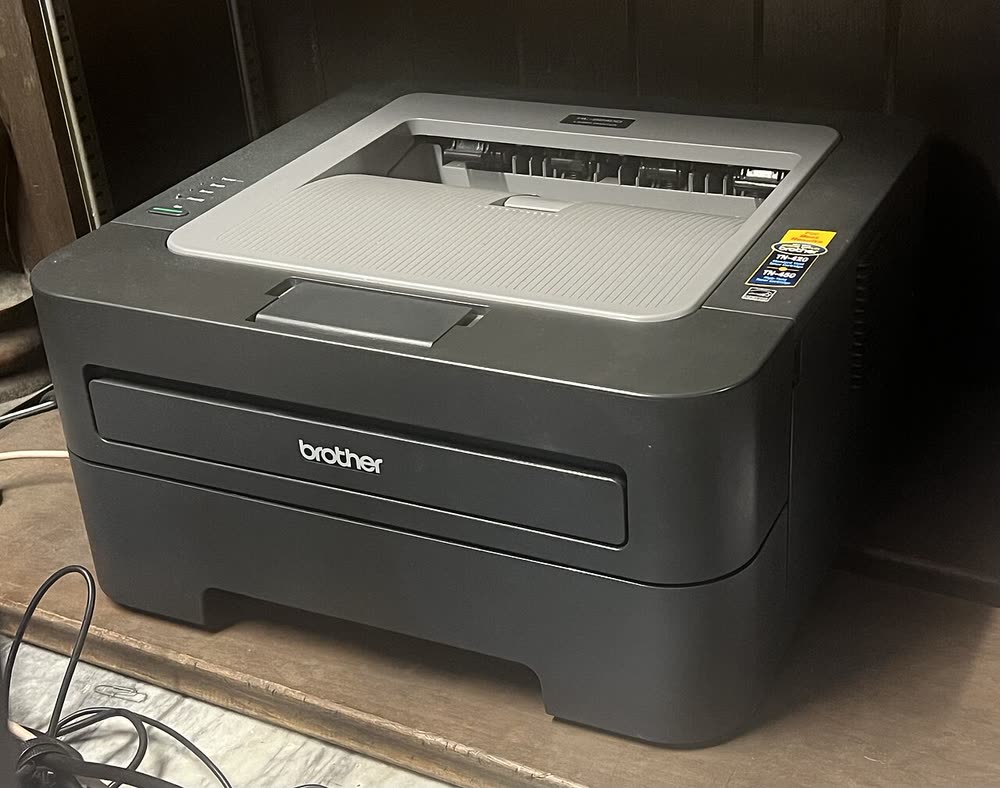
The HL-2270DW was the breakout budget mono laser of the early 2010s and a surprising number of them are still running in home offices. It prints 27 pages a minute with automatic duplexing and both Wi-Fi and Ethernet, which was unusual at its price. Owners mostly deal with the 'Replace Toner' lockout, which can be bypassed with the continue-mode setting in the menu, and with older Windows 11 installs that lose the driver. Third-party TN-450 cartridges work without firmware blocking on this generation.
Sold in United States, Canada, United Kingdom, Europe, Australia
The HL-2270DW was the breakout budget mono laser of the early 2010s and a surprising number of them are still running in home offices. It prints 27 pages a minute with automatic duplexing and both Wi-Fi and Ethernet, which was unusual at its price. Owners mostly deal with the 'Replace Toner' lockout, which can be bypassed with the continue-mode setting in the menu, and with older Windows 11 installs that lose the driver. Third-party TN-450 cartridges work without firmware blocking on this generation.
Best for: Owners of a reliable old home mono laser who just need it to keep working
Install from Brother's Full Driver & Software Package rather than relying on Windows Update, which often maps this model to a generic driver. For wireless setup, hold the Go button sequence described in the manual or use the WPS button on your router; the printer only supports 2.4 GHz networks. If the printer drops off Wi-Fi after a router change, print the Network Configuration page (hold Go for about 5 seconds, press once more) to confirm its IP address.
The Brother HL-2270DW uses the following consumables. Match the number exactly when you buy: the same printer family often uses several different cartridge numbers by region.
High-yield (XL) versions almost always cost less per page if you print regularly. On third-party ink and toner, read our honest assessment first, and note that some manufacturers push firmware that rejects non-original chips.
| Print Speed | 27 ppm |
|---|---|
| Resolution | Up to 2400 x 600 dpi |
| Duplex | Automatic |
| Adf | None |
| Paper Capacity | 250 sheets + 1 manual feed |
| Display | LED indicators |
| Connectivity | Wi-Fi, Ethernet, USB |
| Mobile | Brother iPrint&Scan, AirPrint |
| Os | Windows 11/10, macOS, Linux |
| Dimensions | 14.4 x 14.2 x 7.2 in |
| Weight | 15.0 lb |
| Monthly Duty | Up to 10,000 pages |
| Extra | Toner TN-420 standard / TN-450 high-yield; drum DR-420. AirPrint support depends on the last firmware update being applied |
| Functions |
Every link goes to the manufacturer or an official app store. We never host modified installers.
| Code or message | What it means |
|---|---|
| Replace Toner | Toner page counter reached its limit; the cartridge often still has toner and the counter can be reset from the front panel |
| Drum End Soon | DR-420 drum approaching its 12,000-page life |
| Toner Ended | Printer will not print until the toner is replaced or the counter is overridden |
No reviews yet. If you own this model, share what works and what does not.
Reviews appear after moderation.
Home offices that want a tiny laser copier with bargain supplies
A single-PC budget mono printer that still has cheap supplies
Home offices that print mostly black text and want a reliable wired or 5 GHz connection
Home offices that want a touchscreen laser all-in-one without fax
Share your screen, we diagnose the driver, Wi-Fi or firmware problem and fix it while you watch. One affordable annual plan covers every printer in your home or office.
Questions & comments (0)
No comments yet. Describe your printer model, operating system and the exact message you see; comments appear after review.
Ask about this page
Your comment appears after our team approves it. Or sign in to post faster.