Canon · imagePROGRAF PRO
Canon imagePROGRAF PRO-310
Photographers buying a new archival 13-inch pigment printer
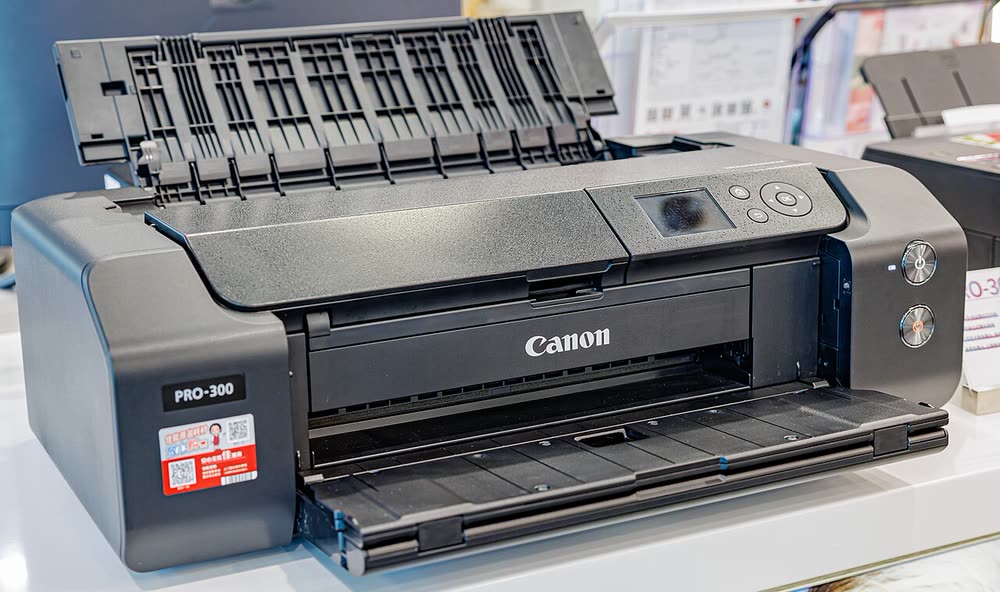
The PRO-300 is a 13-inch pigment printer for photographers and fine-art sellers who need archival prints with deep blacks on both glossy and matte papers, thanks to dedicated photo and matte black inks that no longer need swapping. It replaced the PIXMA PRO-10 and moved to the imagePROGRAF brand. Running costs are moderate for its class, and because pigment ink settles, the printer agitates its tanks and may pause before big jobs.
Sold in United States, Canada, United Kingdom, Europe, Australia, India
The PRO-300 is a 13-inch pigment printer for photographers and fine-art sellers who need archival prints with deep blacks on both glossy and matte papers, thanks to dedicated photo and matte black inks that no longer need swapping. It replaced the PIXMA PRO-10 and moved to the imagePROGRAF brand. Running costs are moderate for its class, and because pigment ink settles, the printer agitates its tanks and may pause before big jobs.
Best for: Photographers selling archival 13 x 19 inch prints
Use Ethernet or 2.4 GHz Wi-Fi from the LCD, then install Professional Print and Layout for soft-proofing and 16-bit output from Lightroom. Feed heavy fine-art sheets one at a time through the rear manual slot with the driver set to the matching media. Download paper-maker ICC profiles for non-Canon stock and run a nozzle check before important prints.
The Canon imagePROGRAF PRO-300 uses the following consumables. Match the number exactly when you buy: the same printer family often uses several different cartridge numbers by region.
High-yield (XL) versions almost always cost less per page if you print regularly. On third-party ink and toner, read our honest assessment first, and note that some manufacturers push firmware that rejects non-original chips.
| Print Speed | Approx. 1 min 30 sec per 8 x 10 in photo |
|---|---|
| Resolution | Up to 4800 x 2400 dpi |
| Duplex | None |
| Adf | None |
| Paper Capacity | 100 sheets rear tray plus manual feed; 13 x 19 in, panoramas up to 39 in |
| Display | 3.0-inch LCD |
| Connectivity | Wi-Fi, Ethernet, USB |
| Mobile | Canon PRINT, AirPrint |
| Os | Windows 11/10, macOS, iOS, Android |
| Dimensions | 25.2 x 15.0 x 7.9 in |
| Weight | 31.5 lb |
| Extra | Ten pigment inks (PFI-300) including Chroma Optimizer and matte black; replaced the PIXMA PRO-10; PRO-310 announced January 2025 as successor |
| Functions |
Every link goes to the manufacturer or an official app store. We never host modified installers.
| Code or message | What it means |
|---|---|
| 1200 | Cover open |
| 1300 | Paper jam |
| 1660 | Ink tank not installed |
| 1700 | Ink absorber almost full |
| B200 | Printhead fault |
No reviews yet. If you own this model, share what works and what does not.
Reviews appear after moderation.
Share your screen, we diagnose the driver, Wi-Fi or firmware problem and fix it while you watch. One affordable annual plan covers every printer in your home or office.
Questions & comments (0)
No comments yet. Describe your printer model, operating system and the exact message you see; comments appear after review.
Ask about this page
Your comment appears after our team approves it. Or sign in to post faster.