Best Printer for Small Business 2026: Office AIOs and Lasers Compared
A small-business printer is judged on cost per page, duty cycle and how it behaves at 4:55pm on a Friday. Here are the eight worth buying in 2026.

On this page
- Quick picks
- How we chose
- HP OfficeJet Pro 9135e: best all-round
- Brother MFC-L2900DW: best small mono laser
- Brother MFC-L3780CDW: best colour laser
- HP LaserJet Pro 4112fdw and the March 2026 refresh
- Xerox C315: colour laser on a budget
- Canon MAXIFY GX and Epson WorkForce Pro: lowest colour cost
- What to avoid
- Verdict
Small-business printing is a different problem from home printing. Volume is higher and lumpier, downtime costs money, someone other than you will need to use the machine, and the total cost over three years is dominated by consumables rather than the purchase price. The right question is not "which printer is best" but "which printer is cheapest to run at my volume without falling over".
This guide covers the models we recommend to clients in 2026, including HP's March 2026 LaserJet Pro refresh, the new Xerox A4 colour line that arrived after the Lexmark acquisition, and Brother's next-generation INKvestment business inkjets announced in July 2026.
Quick picks
| Model | Type | Best for | Approx price |
|---|---|---|---|
| HP OfficeJet Pro 9135e | Colour inkjet AIO | Best all-round small office | USD 280-330 / GBP 230-280 / AUD 449-529 |
| HP OfficeJet Pro 9125e | Colour inkjet AIO | Same engine, fewer trays, lower price | USD 230-270 |
| Brother MFC-L2900DW | Mono laser AIO | Two to five people, text documents | USD 250-300 / GBP 220-260 |
| Brother MFC-L3780CDW | Colour laser AIO | Best colour laser for small teams | USD 500-600 / GBP 420-500 |
| HP LaserJet Pro 4112fdw | Mono laser AIO | High mono volume, 47 ppm | USD 550-700 |
| HP LaserJet Pro 4101fdw | Mono laser AIO | Previous-generation value buy | USD 400-500 |
| Xerox C315 | Colour laser AIO | Colour laser on a budget | USD 400-470 |
| Canon MAXIFY GX2020 / GX4020 | Pigment ink tank AIO | Lowest cost per colour page | USD 350-550 |
| Epson WorkForce Pro WF-4830 / WF-C5890 | Business inkjet | Low power draw, high colour volume | USD 250-900 |
How we chose

We weighted four things.
- Three-year total cost at the buyer's actual monthly volume, including toner or ink, drums and imaging units. Drums are the cost most people forget on colour lasers.
- Duty cycle headroom. A printer rated at 30,000 pages a month is not designed to print 30,000 pages a month. Aim for a recommended monthly volume at least three times your real number.
- Paper handling. Duplex printing, a real 250-sheet minimum tray, and an ADF that does single-pass duplex scanning. These features save more staff time than any speed increase.
- Network and security behaviour, including whether the printer holds a static IP reliably and supports current TLS. Printers are a well-known soft spot on small networks; see printer security basics.
HP OfficeJet Pro 9135e: best all-round
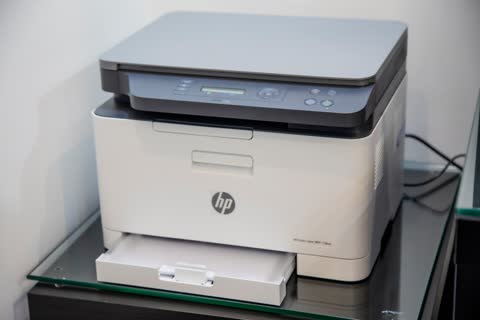
The OfficeJet Pro 9100 series remains the default recommendation for a two-to-eight-person office with mixed colour and mono output. The 9135e adds a second paper source and a slightly better panel over the 9125e; the print engine is identical.
Specs. Around 22 ppm mono and 18 ppm colour ISO, automatic duplex printing, 35-sheet ADF with single-pass duplex scanning, 250-sheet tray, Ethernet plus dual-band Wi-Fi, fax, 2.7-inch touchscreen.
Running cost. HP 910XL and 936e cartridges depending on SKU, roughly 1.5 to 2.5 cents mono and 7 to 9 cents colour. Instant Ink subscriptions can cut colour cost sharply at predictable volume but tie you to a monthly page allowance.
Pros. Genuinely fast for an inkjet. Excellent scanning software. Low power draw compared with a colour laser. Very good mobile and cloud printing.
Cons. The "e" suffix signals HP+ eligibility. Enrolling in HP+ permanently locks the printer to genuine HP cartridges and requires a persistent internet connection. That is a defensible trade if you want Instant Ink, and a bad trade if you ever want third-party supplies.
Who it suits. Offices printing 300 to 1,500 pages a month with real colour needs.
Known issues. Cartridge-recognition errors after firmware updates are the commonest ticket on this family; see HP ink cartridge problem. Wi-Fi dropouts on mesh networks are second; put it on Ethernet if you can.
Brother MFC-L2900DW: best small mono laser
If your output is invoices, contracts, packing slips and correspondence, colour is a distraction and a mono laser is the right tool. The MFC-L2900DW prints around 34 ppm with automatic duplex, has a 50-sheet ADF, a 250-sheet tray, Wi-Fi and Ethernet.
Running cost. TN830XL toner at $70 to $90 for about 3,000 pages, so 2.5 to 3 cents a page. Drum units run roughly 15,000 pages at $100 to $130, adding under a cent.
Pros. No clogs ever. Toner stores indefinitely. Third-party toner is widely available and generally works. Brother's drivers are stable across Windows and macOS updates.
Cons. Mono only. Scanner resolution is basic. The ADF is simplex on this model; the L2905DW and higher add duplex scanning.
Who it suits. Trades, letting agents, clinics, anyone printing 200 to 1,500 mono pages a month.
Known issues. Toner and drum reset sequences after replacement confuse people regularly; see replacing Brother toner.
Brother MFC-L3780CDW: best colour laser

Brother's colour laser AIO is the machine we recommend when a business needs colour that will not smudge, on plain paper, at laser speed. Around 31 ppm colour and mono, single-pass duplex scanning through a 50-sheet ADF, 250-sheet tray plus multipurpose slot, Ethernet, 3.5-inch touchscreen.
Running cost. TN229XL or TN227-series toner depending on region, roughly 3 cents mono and 12 to 15 cents colour at high yield. Four drums are consumables too; budget for them at around 18,000 pages.
Pros. Colour output is instantly dry and highlighter-safe. Excellent for marketing collateral, colour-coded reports and forms. Strong duty cycle.
Cons. Expensive consumables compared with pigment inkjet. Heavy, around 26 kg. Photo output on glossy paper is mediocre, which is normal for colour laser.
Who it suits. Estate agents, consultancies, schools, any business printing 100 to 600 colour pages a month.
HP LaserJet Pro 4112fdw and the March 2026 refresh
HP overhauled its mono LaserJet Pro line in March 2026, and the new 4000 and 4100 series shipped from May. The MFP 4112fdw prints at 47 ppm letter (45 ppm A4) with a 3.7-second first page out, 42 ipm duplex, Wi-Fi 6 with self-reset, Gigabit Ethernet and fax. The print-only 4006dw is the same engine without the scanner; HP Canada listed it at CAD 459.99.
Two notable changes. First, HP is shipping what it calls TerraJet toner, quoted at around 11 percent more pages than the previous generation. Second, these are the first small-business printers HP has shipped with quantum-resistant cryptography in the firmware, which matters mainly for organisations with long-horizon compliance requirements.
Running cost. Cartridge part numbers were not confirmed at launch, so treat any per-page figure as provisional. The previous-generation 4101fdw runs roughly 1.5 to 2 cents a page on high-yield toner, and HP's claim implies the new generation should land slightly below that.
Pros. Very fast, very quiet for the speed, 350-sheet input, three-year warranty on registration in several markets. An 80,000-page duty cycle means it is genuinely built for volume.
Cons. Expensive. Overkill under about 1,000 pages a month. HP's Dynamic Security policies apply to LaserJet toner, so plan on genuine cartridges.
Who it suits. Offices printing 1,000 to 5,000 mono pages a month. Below that, the 4101fdw at $400 to $500, or the Brother MFC-L2900DW, is better value.
Xerox C315: colour laser on a budget
The C315 remains the value colour laser AIO at roughly $400 to $470, offering around 33 ppm colour, duplex, ADF and Ethernet. Worth knowing: after Xerox completed its acquisition of Lexmark, June 2026 brought the first hardware under the unified brand, the A4 colour C240, C245, C255a, C303a and C305ae, built on Lexmark engines with post-quantum cryptography support and over 50 percent post-consumer recycled plastic. These are the C315's successors and are shipping in North America, Western Europe, Australia and New Zealand.
Running cost. High-yield toner brings colour pages to roughly 12 to 16 cents. Xerox's per-page cost is competitive but the imaging unit is a significant scheduled cost.
Pros. Cheapest credible colour laser AIO. Solid network stack. Good driver support.
Cons. Xerox retail supply chains are thinner than HP or Brother in some markets. Check local toner availability before committing. See our Xerox brand hub for support routes.
Canon MAXIFY GX and Epson WorkForce Pro: lowest colour cost

If you print a lot of colour on plain paper, neither laser nor cartridge inkjet is the cheapest option. Pigment ink tank machines are. The Canon MAXIFY GX2020 and GX4020 use refillable pigment tanks with costs under two cents a colour page, and Epson's WorkForce Pro range does the same with DURABrite pigment ink.
At the top end, Epson announced the WorkForce Enterprise AM-C10000 in June 2026, a 100 ppm A3 business inkjet MFP rated for 25,000 to 100,000 pages a month and claiming up to 80 percent lower power consumption than an equivalent colour laser. That is a managed-print purchase rather than a retail one, but it signals where high-volume office printing is heading.
Pros. Dramatically lower colour cost. Pigment ink is highlighter-safe and water-resistant. Much lower power draw and no warm-up.
Cons. Slower than laser on the first page. Photo output on glossy paper is poor with pigment. Maintenance boxes are a consumable.
What to avoid
- Home printers in a business. A $90 cartridge AIO at 800 pages a month will cost $150 a month in ink and die within a year.
- Buying colour laser for photographic output. It is the wrong technology; use a lab or a photo printer.
- Ignoring drum and imaging unit costs. On colour lasers these can equal the toner cost over the machine's life.
- Wi-Fi-only placement. Business printers should be on Ethernet with a DHCP reservation. Wi-Fi is the single biggest cause of "the printer is offline again"; see printer offline.
- Signing a three-year managed print contract for under 1,000 pages a month. The minimums usually exceed what buying outright would cost.
Verdict
For most small businesses the HP OfficeJet Pro 9135e is the right first purchase: fast enough, cheap enough to run, and capable of colour when needed. Choose the Brother MFC-L2900DW instead if your output is text and you want the fewest possible support calls, and the MFC-L3780CDW if colour must be laser-crisp. Move up to the HP LaserJet Pro 4112fdw only when mono volume passes about a thousand pages a month, and look at Canon MAXIFY GX or Epson WorkForce Pro when colour volume is high enough that toner economics stop making sense.
If you are deploying more than one machine, or need static addressing, scan-to-folder and driver deployment sorted properly, our team can do it remotely through the support plan. You can also browse specifications on our printer database.
Software mentioned in this guide
- Brother Mobile Connect
Brother's current mobile app for setup, printing, scanning and supplies iOS · Android - Canon PRINT
Canon's single mobile app for printing, scanning and printer setup iOS · Android - Epson Smart Panel
Epson's current mobile app for setup, printing, scanning and ink levels iOS · Android - HP Smart (the HP app)
HP's official setup, printing, scanning and ink app for home and small-office printers Windows · macOS · iOS - Windows printer settings
How Windows installs printers, and the shift to driverless Windows Ready Print Windows
Printers covered here
Frequently asked questions
What is the best printer for a small business in 2026?
The HP OfficeJet Pro 9135e at around $280 to $330 for offices with mixed colour and mono output up to about 1,500 pages a month. If your printing is almost entirely text, the Brother MFC-L2900DW mono laser is cheaper to run and generates fewer problems.
Should a small business buy inkjet or laser?
Laser for high mono volume, crisp text and instant-dry output. Business inkjet or pigment ink tank for high colour volume, because colour toner costs 12 to 16 cents a page against under 2 cents for pigment ink. Below about 300 pages a month either works and you should choose on features.
Is HP+ worth it for a business printer?
Only if you intend to use Instant Ink. HP+ permanently restricts the printer to genuine HP cartridges and requires a continuous internet connection, and the decision is made once during first setup and cannot be undone. If you want the freedom to buy third-party supplies, decline it.
What duty cycle do I need?
Take your real monthly page volume and buy a printer whose recommended monthly volume is at least three times that. Maximum duty cycle is a stress rating, not a target. A machine run near its maximum will fail early and jam frequently.
Is the new HP LaserJet Pro 4112fdw worth the extra over the 4101fdw?
Above about 1,500 mono pages a month, yes: it is faster at 47 ppm, has a 350-sheet input, Wi-Fi 6 and a longer duty cycle, and HP's TerraJet toner is quoted at around 11 percent more pages. Below that volume the 4101fdw at $400 to $500 does the same job for less.
How should I connect a business printer?
Ethernet, with a DHCP reservation on the router so the address never changes, then install by IP address rather than by network discovery. Wi-Fi is acceptable for a single-desk machine but is the leading cause of intermittent offline errors in small offices.
Consumer-tech editor covering printers and home-office gear for US and Canadian readers.
Questions & comments (0)
No comments yet. Describe your printer model, operating system and the exact message you see; comments appear after review.
Ask about this page
Your comment appears after our team approves it. Or sign in to post faster.