Best Photo Printer 2026: Home Prints, Portable and Pro Compared
Photo printing splits three ways: cheap-per-print tank machines, dye-sub pocket printers, and pigment pro printers for exhibition work. Here is which to buy in 2026.
On this page
- Quick picks
- How we chose
- Epson EcoTank Photo ET-8550: best overall
- Canon PIXMA PRO-200: best glossy output
- Epson SureColor P700 and P900: the professional choice
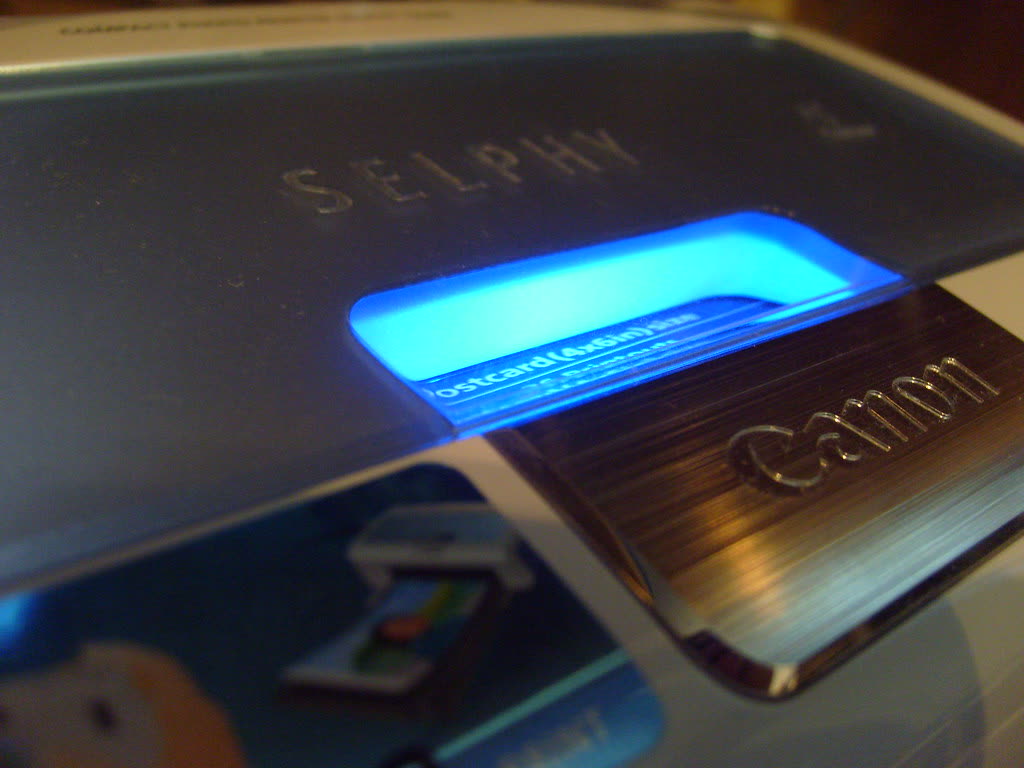
- Canon SELPHY CP1500: best small photo printer
- Fujifilm instax mini Link+: keepsakes, not photographs
- Kodak Dock Plus
- What about an all-in-one that also does photos?
- What to avoid
- Verdict
Photo printing is the one printer category where the honest advice starts with a warning: if you print fewer than about twenty photos a month, a print lab will be cheaper and usually better. People buy photo printers anyway, and for good reasons: colour control, immediate results, unusual paper stocks, and not sending family pictures to a third party. This guide assumes you have made that decision and want the right machine.
There are three distinct technologies here and they are not interchangeable. Inkjet photo printers spray ink onto paper and dominate anything above 5 x 7 inches. Dye sublimation printers transfer dye from a ribbon and produce sealed, water-resistant 4 x 6 prints at a fixed cost. Instant film printers expose real instant film and produce keepsakes rather than photographs in any archival sense.
Quick picks
| Model | Type | Best for | Approx price |
|---|---|---|---|
| Epson EcoTank Photo ET-8550 | 6-ink tank, A3+ | Best overall, cheapest per print | USD 750-850 / GBP 700-800 / AUD 1,199-1,399 |
| Epson EcoTank Photo ET-8500 | 6-ink tank, A4 | Same inks, smaller and cheaper | USD 550-650 |
| Canon PIXMA PRO-200 | 8-ink dye, A3+ | Best glossy and lustre output | USD 500-600 / GBP 480-560 |
| Epson SureColor P700 | 10-ink pigment, A3+ | Archival prints, matte and fine art | USD 800-900 |
| Epson SureColor P900 | 10-ink pigment, A2 | Exhibition and sale prints | USD 1,250-1,400 |
| Canon SELPHY CP1500 | Dye-sub, 4x6 | Best small photo printer | USD 130-160 / GBP 130-150 / AUD 249-279 |
| Fujifilm instax mini Link+ | Instant film | Keepsakes and parties | USD 169.95 / CAD 189.99 / EUR 149.99 |
| Kodak Dock Plus | Dye-sub, 4x6 | Docking a phone directly | USD 100-150 |
| Canon PIXMA G3270 (MegaTank) | 4-ink tank AIO | Documents plus occasional photos | USD 230-270 |
How we chose

- Cost per print at real sizes, calculated from ink or ribbon cost plus paper, not from ISO document yields, which are meaningless for photos.
- Colour gamut and gradation, particularly in skin tones, deep shadows and neutral greys, where four-ink printers visibly struggle.
- Print permanence. Pigment inks on rag paper are rated for many decades; dye inks fade faster; dye-sub prints are sealed and handle handling well; instant film is not archival at all.
- Maintenance behaviour. Photo inkjets that sit idle clog, and eight-to-ten-ink machines waste a lot of ink recovering. This weighs heavily against the pro models for casual users.
Epson EcoTank Photo ET-8550: best overall
The ET-8550 is a six-ink tank printer that prints up to A3+ (13 x 19 inches) and also scans and copies. It uses Claria ET Premium inks with a dedicated photo black, a pigment black for text, plus cyan, magenta, yellow and grey. The grey ink is what separates it from ordinary four-colour tank machines: neutral tones and black-and-white prints look far cleaner.
Running cost. This is the headline. Refill bottles cost roughly $15 to $22 each, and a borderless 4 x 6 print works out around 3 to 6 cents of ink. An A4 print is roughly 25 to 40 cents, and an A3+ print around 60 cents to $1. Against a cartridge photo printer at $1 to $2 for an A4 print, the machine repays its purchase premium after a few hundred prints.
Pros. By far the lowest cost per photo of any printer here. Excellent colour, good black-and-white with the grey ink. Scanner included. Prints on CDs and on thick fine art stock through the rear feed. Wi-Fi, Ethernet and card slot.
Cons. Dye-based, so prints are less fade-resistant than pigment. Not a document workhorse: slow on plain paper. Large. Tanks must be filled carefully and the printer cannot be transported once filled.
Who it suits. Enthusiasts printing dozens of photos a month, small print-on-demand sellers, anyone who wants A3+ output without pro pricing. The A4-only ET-8500 uses the same inks for $200 less if you never need A3.
Known issues. Shares the EcoTank family traits: nozzle clogs after long idle periods, and an eventual waste ink pad service message covered in Epson ink pad end of service life. Print something weekly.
Canon PIXMA PRO-200: best glossy output
An eight-ink dye-based A3+ printer that has held its position as the enthusiast favourite because it does one thing better than anything at its price: glossy and lustre prints with deep, saturated colour and no bronzing.
Specs. Eight ChromaLife100+ dye inks including grey and light grey, A3+ borderless, Wi-Fi and Ethernet, roughly 90 seconds for a bordered A3+ print.
Running cost. CLI-65 cartridges at roughly $17 to $22 each, eight of them. An A3+ print costs around $1.50 to $2.50 in ink. Considerably more per print than the ET-8550, but the machine is $250 cheaper to buy.
Pros. Outstanding glossy and semi-gloss output. Wide gamut, especially in blues and reds. Canon's Professional Print and Layout software with soft proofing is excellent and free. Quiet.
Cons. Dye ink means shorter display life than pigment, particularly unframed. Poor on matte and fine art papers compared with pigment machines. Eight cartridges to replace. No scanner.
Who it suits. Enthusiasts and portrait photographers printing mostly on gloss and lustre, who print in bursts rather than daily.
Known issues. Like all multi-ink Canon photo printers, extended idleness triggers deep cleaning cycles that consume significant ink and eventually drive up the waste absorber counter; see Canon error 5B00.
Epson SureColor P700 and P900: the professional choice
These are the machines for prints that get sold, exhibited or framed for decades. Both use ten UltraChrome PRO10 pigment inks, including violet for an extended gamut and both photo black and matte black loaded simultaneously, which removes the ink-wasting black-swap step older pro printers required.
Specs. P700 prints to A3+ (13 inches wide); P900 prints to A2 (17 inches wide). Both take roll paper with an optional adapter, have front-in and front-out fine art paper paths, colour touchscreens, Wi-Fi and Ethernet.
Running cost. Cartridges are 25 ml on the P700 and 50 ml on the P900, at roughly $35 to $45 each. An A3+ print costs around $2 to $3 in ink; an A2 print on the P900 around $4 to $6. Fine art paper often costs more than that again.
Pros. Best-in-class black-and-white with three levels of neutral ink. Print permanence rated in the decades to a century on appropriate paper. Superb on matte and textured fine art stocks where dye printers look flat. Compact for what they are.
Cons. Expensive to buy and to feed. Pigment ink needs the printer used regularly or nozzle checks become a routine chore. Overkill for family snapshots.
Who it suits. Working photographers, artists selling prints, anyone whose output is framed and hung. If you print fewer than about ten large prints a month, use a professional lab instead.
Canon SELPHY CP1500: best small photo printer

Dye sublimation, 4 x 6 inches, about 41 seconds per print, and a fixed, predictable cost. The SELPHY prints in four passes: yellow, magenta, cyan, then a clear laminate layer that makes the print water-resistant and fingerprint-proof.
Running cost. The KP-108IN pack contains ribbon and paper for 108 prints at roughly $30 to $35, so about 28 to 32 cents per print, all in. That is genuinely comparable to a high-street print kiosk and you get the result immediately.
Pros. Consistent, lab-like 4 x 6 prints. Cannot clog, because there is no liquid ink. Sealed prints survive handling and spills. Prints from phone, USB drive or SD card, and works over Wi-Fi with AirPrint. Optional battery pack makes it portable.
Cons. Only 4 x 6 and smaller. Fixed cost even for a print you throw away. Dye-sub gradation is very good but the gamut is narrower than a good inkjet on gloss.
Who it suits. Families, event photographers, anyone who wants physical 4 x 6 prints regularly without thinking about ink.
Fujifilm instax mini Link+: keepsakes, not photographs
Announced in January 2026 at $169.95 in the US and CAD 189.99 in Canada, with European pricing from EUR 149.99, the mini Link+ is a Bluetooth printer that exposes genuine instax mini film from your phone. Reviewers consider it the sharpest portable instax printer Fujifilm has made.
Running cost. instax mini film costs roughly 60 to 90 cents per shot in twin packs, which is expensive per print but the point is the object, not the economics.
Pros. Real instant film with the credit-card format everyone recognises. Fun app with frames, collages and video-frame printing. Battery powered and pocketable.
Cons. Tiny prints (about 62 x 46 mm image area). Not archival. Most expensive per square inch of any printer here.
Who it suits. Parties, weddings, scrapbooking, gifts. Not a substitute for a photo printer.
Kodak Dock Plus
A dye-sub 4 x 6 printer whose distinguishing feature is a dock connector that charges and prints from a phone simultaneously. Print quality sits slightly behind the SELPHY, and cartridge packs run roughly 50 to 70 cents per print, noticeably more than Canon's.
Who it suits. Households that value the dock convenience over per-print cost. If cost matters, the SELPHY CP1500 is the better buy.
What about an all-in-one that also does photos?
If photos are occasional and documents are the main job, a four-ink tank all-in-one such as the Canon PIXMA G3270 handles 4 x 6 and A4 prints acceptably at very low cost. It will not match a six- or eight-ink machine on skin tones or shadow detail, but for holiday snaps on the fridge it is fine, and it costs a quarter of a dedicated photo printer. See our ink tank printer guide for the wider comparison.
What to avoid
- Four-ink cartridge printers marketed as photo printers. Without grey or light inks, gradations band and black-and-white prints go green or magenta.
- Buying a pro pigment printer for occasional use. Idle time is its enemy. A P900 used twice a year will spend more ink on cleaning than on prints.
- Third-party ink in a photo printer. Colour accuracy and permanence depend on ink chemistry matching the ICC profiles. Save third-party supplies for document printing; see third-party ink and toner.
- Cheap glossy paper. It curls, bronzes and blocks. Paper quality is at least as important as printer choice.
- Judging a print under warm indoor light. Evaluate under daylight-balanced light or you will chase a colour cast that is not there.
Verdict
The Epson EcoTank Photo ET-8550 is the printer most photo enthusiasts should buy in 2026: A3+ output, six inks including grey, and a cost per print low enough that you will actually print. Choose the Canon PIXMA PRO-200 instead if your work is glossy and you want the best colour per dollar of hardware, and step up to the SureColor P700 or P900 only if prints are being sold or exhibited. For 4 x 6 snapshots, the Canon SELPHY CP1500 beats every inkjet on convenience and consistency, and the instax mini Link+ is a toy in the best sense.
Photo printers are also the most sensitive to setup, colour profiles and driver problems. If yours prints with a cast, bands, or refuses to see your fine art paper path, our specialists can work through it with you on the support plan, and our maintenance guide covers the weekly habits that keep photo heads clear.
Software mentioned in this guide
- Apple AirPrint
Driverless printing built into iPhone, iPad and Mac iOS · macOS - Canon PRINT
Canon's single mobile app for printing, scanning and printer setup iOS · Android - Epson Smart Panel
Epson's current mobile app for setup, printing, scanning and ink levels iOS · Android - macOS Printers and Scanners
Where macOS adds printers, scans documents and resets the printing system macOS
Printers covered here
Frequently asked questions
What is the best photo printer in 2026?
The Epson EcoTank Photo ET-8550 for most people, at around $750 to $850. It prints up to A3+ with six inks including grey, and refillable tanks bring the cost of a 4 x 6 print down to roughly 3 to 6 cents of ink. For glossy-only work at a lower hardware price, the Canon PIXMA PRO-200 is the alternative.
Is it cheaper to print photos at home or at a lab?
Below about twenty prints a month, a lab is cheaper once you include the printer, paper and wasted ink from cleaning cycles. Above that, a tank photo printer like the ET-8550 wins clearly. People print at home for control, immediacy and paper choice rather than savings.
Do I need pigment ink or is dye good enough?
Dye ink gives punchier colour on glossy paper and costs less; pigment gives far better results on matte and fine art stock and lasts decades rather than years on display. If your prints go in albums or frames behind glass, dye is fine. If they are sold or exhibited, buy pigment.
How much does a photo cost to print at home?
On an Epson ET-8550, roughly 3 to 6 cents of ink for a 4 x 6 and 25 to 40 cents for an A4, plus paper. On a Canon PIXMA PRO-200, an A3+ costs $1.50 to $2.50 in ink. A Canon SELPHY dye-sub print is a fixed 28 to 32 cents including paper. Instant film runs 60 to 90 cents a shot.
What is the best portable photo printer?
The Canon SELPHY CP1500 for real 4 x 6 photographs at about 30 cents each, with an optional battery for true portability. The Fujifilm instax mini Link+, launched January 2026 at $169.95, is the pick if you want instant-film keepsakes rather than photographic prints.
Why do my home photo prints look different from my screen?
Almost always because the screen is not calibrated and the printer is not using a paper-specific ICC profile. Download the profile for your exact paper from the paper maker, select it in the print dialog, turn off double colour management, and judge prints under daylight-balanced light.
Questions & comments (0)
No comments yet. Describe your printer model, operating system and the exact message you see; comments appear after review.
Ask about this page
Your comment appears after our team approves it. Or sign in to post faster.