Canon PIXMA TS6420a vs Epson Expression Home XP-4200: The Cheap All-in-One Showdown
Two sub-$120 home all-in-ones with very different ink strategies: Canon's five-tank system for photos, Epson's four-cartridge setup for cheaper documents.

On this page
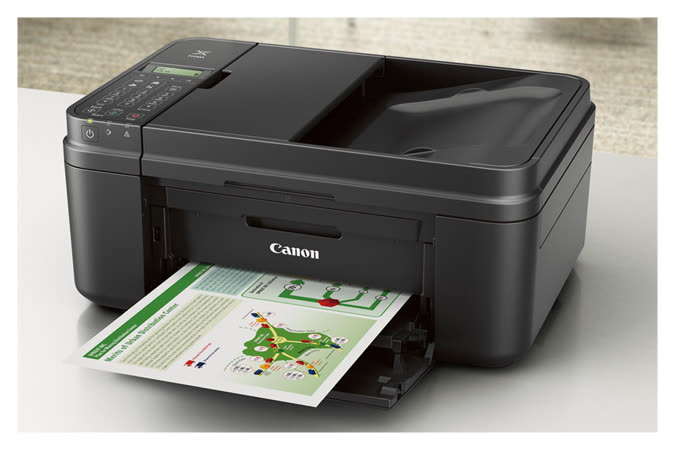
At the budget end of the all-in-one market the specification sheets look nearly identical: print, scan, copy, Wi-Fi, automatic duplex, no document feeder. What separates the Canon PIXMA TS6420a from the Epson Expression Home XP-4200 is the ink architecture, and that decides both what the printer is good at and what it costs to feed.
This is a comparison worth taking seriously, because a badly matched budget printer costs more in consumables in eighteen months than the machine did.
Specifications side by side
| Specification | Canon PIXMA TS6420a | Epson Expression Home XP-4200 |
|---|---|---|
| Functions | Print, scan, copy | Print, scan, copy |
| Ink system | Five individual tanks (PGI-275 pigment black plus CLI-276 BK/C/M/Y) | Four individual cartridges (Epson 232 / 232XL) |
| Print speed (approx.) | Around 13 ipm mono / 6.8 ipm colour | Up to 10 ppm mono / 5 ppm colour (ISO) |
| Print resolution | Up to 4800 x 1200 dpi | Up to 5760 x 1440 dpi |
| Automatic duplex | Yes | Yes |
| ADF | None | None |
| Paper capacity (approx.) | Around 100 sheets | 100-sheet front cassette |
| Scanner | Flatbed CIS, 1200 dpi optical | Flatbed CIS, 1200 dpi optical |
| Connectivity | Wi-Fi, Wi-Fi Direct, USB 2.0, Bluetooth on some regional variants | Wi-Fi (2.4 GHz), Wi-Fi Direct, USB 2.0 |
| Display | 1.44 in OLED with buttons | 1.44 in colour LCD with buttons |
| Borderless photo | Yes, up to 8.5 x 11 in | Yes, up to 8.5 x 11 in |
| Dimensions (approx.) | 373 x 315 x 141 mm | 375 x 300 x 169 mm |
The row that matters most is the first one about ink. Canon's five-tank layout separates a pigment black for crisp document text from a dye black used in photographs. Epson's four-cartridge system uses one black for everything. On text, Canon's pigment black is visibly sharper and more water-resistant; on photographs, Canon's extra dye black adds shadow depth that a four-ink printer cannot match.
Running costs: cost per page

Both printers punish you if you buy standard-capacity cartridges. Always cost the XL versions.
| Consumable | Approx. US price | Approx. yield | Cost per page |
|---|---|---|---|
| Canon PGI-275XL pigment black | $25 | Around 400 pages | Around 6.3 cents mono |
| Canon CLI-276XL colour (each) | $21 | Around 300 pages | Around 7 cents per colour, per page |
| Epson 232XL black | $26 | Around 500 pages | Around 5.2 cents mono |
| Epson 232XL colour (each) | $21 | Around 350 pages | Around 6 cents per colour, per page |
Loaded up, a mixed colour page lands somewhere around 20 to 27 cents on either machine, and a mono page between 5 and 7 cents. In the UK, Epson 604XL cartridges typically run GBP 17 to 22 each and Canon's PG/CLI equivalents are similar. Those are ordinary cartridge economics, and they are roughly twenty times the per-page cost of a tank printer.
Print quality and everyday speed
The TS6420a is the faster of the two on plain documents and it feels quicker in use, partly because its first-page-out time is shorter. Text is the standout: the pigment black produces dense, non-feathered characters that look closer to laser output than an inkjet has any right to.
The XP-4200 wins on paper on resolution at 5760 x 1440 dpi, and Epson's dye set on glossy photo paper delivers punchy, saturated colour. But because it has no dedicated photo black, deep shadows go slightly flat compared with the Canon. For snapshots at 6x4 nobody would complain; for a framed A4 print the Canon is the better tool.
Both machines are quiet, both are slow when duplexing because they pause to let ink dry, and neither should be asked to produce a 40-page report on a deadline.
Who each printer suits
Choose the Canon PIXMA TS6420a if
- You print photographs, greetings cards or craft projects as well as documents.
- You want document text that holds up to a highlighter or a damp envelope.
- You would rather replace one empty colour than a whole tri-colour cartridge.
- You use a Chromebook or iPad and want reliable AirPrint and Mopria support.
Choose the Epson Expression Home XP-4200 if
- Your printing is overwhelmingly black text: school forms, shipping labels, tickets.
- You want the lowest mono cost per page of the two.
- You prefer a front-loading paper cassette that keeps dust off the stack.
- You already own an Epson and are comfortable with Smart Panel.
Setup, apps and drivers

Canon's setup runs through Canon PRINT on mobile, or Canon IJ Setup on a computer. The mobile flow is straightforward, and Canon does not force an account to complete setup, which is a genuine advantage. Firmware updates are handled in the app and are refreshingly uneventful.
Epson's route is Epson Smart Panel, which is arguably the better-designed of the two apps. It surfaces maintenance tools directly, shows accurate ink levels, and its guided setup handles Wi-Fi Direct fallback cleanly if your router does not cooperate. Scanning to a computer needs Epson ScanSmart installed separately.
Both support AirPrint and Mopria Print Service, so Android and iOS printing works without either vendor app.
Known weaknesses and common errors
Canon PIXMA TS6420a
Canon's consumer PIXMA printers share two well-documented failure modes. The first is printhead failure signalled as error B200, which is effectively terminal on a printer at this price point. The second is the waste ink absorber counter reaching its limit, reported as error 5B00. Neither is common in the first two or three years, but both are worth knowing about before you invest in a drawer of cartridges.
Network dropouts on 2.4 GHz are the routine support ticket; see Canon printer will not connect for the fix, which almost always involves a fixed IP address.
Epson Expression Home XP-4200
The XP-4200 has a permanently mounted printhead, so a serious clog means a new printer. Weekly use avoids it. Epson's ink pad counter behaves the same way as on its tank models and eventually triggers the message covered in Epson ink pad service life. Banding or missing colours usually respond to one or two cleaning cycles; if not, work through streaks and lines when printing.
Regional model names and availability
The TS6420a is a North American retail variant. Buyers elsewhere will not find it under that number.
- United States and Canada: PIXMA TS6420a, using PGI-275 and CLI-276 inks. The XP-4200 uses Epson 232 / 232XL.
- United Kingdom and Ireland: Canon's nearest equivalents are the PIXMA TS7450i and TS6350a, which use PGI-580 and CLI-581 inks. Epson sells the XP-4200 and XP-4205 with Epson 604 / 604XL cartridges.
- Australia and New Zealand: Canon lists the TS7450 family; Epson's XP-4200 is sold locally with 604-series ink.
Ink part numbers do not cross regions. A US CLI-276 will not work in a European TS7450i, and a UK 604 cartridge will not chip-authenticate in a US XP-4200.
Verdict
Choose the Canon PIXMA TS6420a if your printing is mixed. The five-ink system, pigment black text and stronger photo output make it the more capable machine, and being able to replace a single depleted colour is a real running-cost advantage over time.
Choose the Epson Expression Home XP-4200 if you print documents almost exclusively and want the lowest mono cost per page in this class, or if you simply prefer Epson's app.
Honest caveat: both are cartridge printers, and cartridge printers are expensive to run. If your monthly volume is anywhere near 100 pages, look at an ink tank model instead before you buy either. For further reading, the Canon and Epson hubs collect setup and troubleshooting material for both ranges, and how to choose a home office printer puts the decision in a wider context.
Software mentioned in this guide
- Apple AirPrint
Driverless printing built into iPhone, iPad and Mac iOS · macOS - Canon IJ Setup (ij.start.canon)
Canon's setup portal that walks you through installing a PIXMA or MAXIFY printer Windows · macOS · iOS - Canon PRINT
Canon's single mobile app for printing, scanning and printer setup iOS · Android - Epson ScanSmart
Desktop scanning software for Epson scanners and all-in-ones Windows · macOS - Epson Smart Panel
Epson's current mobile app for setup, printing, scanning and ink levels iOS · Android - Mopria Print Service
Cross-brand driverless printing and scanning for Android Android
Printers covered here
Frequently asked questions
Does the Canon TS6420a really use five inks?
Yes. It carries a PGI-275 pigment black for document text alongside four CLI-276 dye inks including a separate photo black. That is why its text looks sharper than a four-ink printer and why photos have better shadow detail.
Which printer has cheaper ink?
For pure black-and-white documents the Epson XP-4200 is marginally cheaper with 232XL cartridges, at roughly 5 cents per page against 6.3 for the Canon. For colour and photo work the Canon usually costs less overall because you replace only the colour that runs out.
Do either of these have an automatic document feeder?
No. Both are flatbed-only, so multi-page copying and scanning means lifting the lid for each sheet. If you need an ADF at this price, look at the Epson WorkForce WF-2960 or Canon PIXMA TR4720 instead.
Can I print double-sided automatically on both?
Yes, both support automatic duplex for plain paper. If duplex output starts printing single-sided unexpectedly, it is nearly always a driver setting rather than a hardware fault.
What is the UK version of the PIXMA TS6420a?
There is no exact match. The closest UK models are the PIXMA TS7450i and TS6350a, which use PGI-580 and CLI-581 inks rather than the North American 275/276 series.
Are compatible cartridges safe to use in these printers?
They work, but both manufacturers push firmware updates that can reject non-genuine chips, and using them may complicate a warranty claim. If you go that route, turn off automatic firmware updates and buy from a supplier that guarantees chip compatibility.
Printer and home-networking specialist who has set up hundreds of inkjet and laser printers across Windows and macOS.



Questions & comments (0)
No comments yet. Describe your printer model, operating system and the exact message you see; comments appear after review.
Ask about this page
Your comment appears after our team approves it. Or sign in to post faster.