Best Printer for Students 2026: Dorm, Apartment and Campus Picks
A student printer needs to be small, cheap to feed, and working at 2am the night before a deadline. That rules out most of what gets recommended.

On this page
- Quick picks
- First: should you buy a printer at all?
- Brother HL-L2460DW: the right answer for most students
- HP LaserJet M110we: smallest for a dorm desk
- Pantum P2502W: the budget option
- Epson EcoTank ET-1910 and ET-2900: if you need colour
- Brother MFC-L2900DW: the shared flat printer
- Canon PIXMA TR4720: the honest budget caveat
- What to avoid
- Cutting your printing costs
- Verdict
Student printer advice usually goes wrong in the same way: it recommends the cheapest all-in-one on the shelf, and eight months later the student has spent more on cartridges than the printer cost, or has a clogged printhead because the machine sat unused from June to September.
The three requirements that actually matter for a student are physical size, cost per page, and tolerance of long idle periods. Speed does not matter. Colour rarely matters. Scanning matters more than most people expect, but a phone app covers it adequately for a while.
Quick picks
| Model | Type | Best for | Approx price |
|---|---|---|---|
| Brother HL-L2460DW | Mono laser | Best overall student printer | USD 130-160 / GBP 130-150 / CAD 199-239 / AUD 249-299 |
| HP LaserJet M110we | Mono laser | Smallest footprint for a dorm desk | USD 100-140 / GBP 90-120 |
| Pantum P2502W | Mono laser | Lowest price that still works | USD 70-100 / GBP 60-90 |
| Epson EcoTank ET-1910 | Ink tank, print only | Colour on a budget, new for 2026 | USD 160 / AUD 299 |
| Epson EcoTank ET-2900 | Ink tank AIO | Colour plus scanning and copying | USD 240 / GBP 250 (ET-2920) |
| Brother MFC-L2900DW | Mono laser AIO | Shared house or flat, ADF scanning | USD 250-300 |
| Canon PIXMA TR4720 | Cartridge AIO | Only if you print under 10 pages a month | USD 80-110 |
First: should you buy a printer at all?

Do this calculation before you spend anything. Most universities give students a free print allowance, typically 200 to 500 pages a year, and charge 5 to 15 cents (or 4 to 10 pence) per page beyond it. Library and department printers handle double-sided, stapling and A3 that no student printer will.
If you print under about 30 pages a month and live near a library, campus printing is cheaper and you avoid owning a machine you have to move every summer. Buy a printer if any of these apply:
- You print drafts constantly and annotate on paper, which many people genuinely learn better from.
- You are on a course with heavy printed output: law, architecture, medicine, education placements.
- You live off campus and a 2am deadline means the library is not an option.
- You share a flat and can split the cost three or four ways, which changes the economics completely.
Brother HL-L2460DW: the right answer for most students
A mono laser is the correct technology for a student, and this is the one to buy. Around 34 pages per minute, automatic duplex printing, a 250-sheet tray, Wi-Fi, Wi-Fi Direct and Ethernet.
Running cost. TN830XL high-yield toner covers roughly 3,000 pages for $70 to $90, so about 2.5 to 3 cents a page. Third-party equivalents run $25 to $40 and generally work fine. One high-yield cartridge will realistically last a full degree for a typical humanities student.
Why it wins. Toner is dry powder. Leave the printer switched off from May to September, come back, print eighty pages of reading. Nothing dries, nothing clogs, no cleaning cycle, no wasted ink. Every inkjet in this guide will have some problem after a three-month break; the Brother will not.
Pros. Automatic duplex halves your paper cost and looks better on submitted work. Fast enough that a 60-page reading pack is a two-minute job. Robust enough to survive being moved between houses each year.
Cons. Mono only. No scanner. Physically larger than the HP alternative. The starter toner in the box is small.
Known issues. The toner and drum reset sequence after replacement confuses people; see replacing Brother toner.
HP LaserJet M110we: smallest for a dorm desk
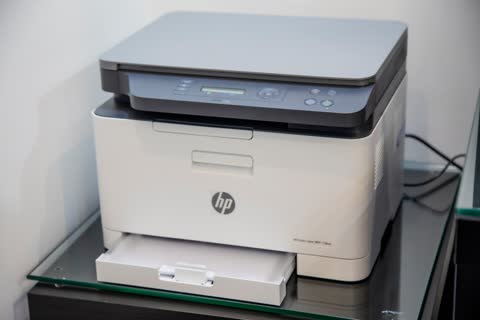
If desk space genuinely is the constraint, this is the smallest mainstream mono laser you can buy, at roughly 21 ppm. It is well built and the HP app makes setup trivial from a phone.
The catch. The "e" suffix means HP+ eligibility. If you enrol during setup you get extra warranty and Instant Ink pages, and the printer is permanently locked to genuine HP toner and requires a continuous internet connection for its entire life. HP 134A toner runs about 6 cents a page, double the Brother.
Who it suits. Students with a very small desk who print little and value the app. Decline HP+ at setup unless you have deliberately chosen Instant Ink; the decision cannot be undone.
Pantum P2502W: the budget option
A functioning mono laser for $70 to $100, which is less than many cartridge inkjets. Around 22 ppm, Wi-Fi, USB, 150-sheet tray. PA-210 toner runs $20 to $35 for 1,600 pages, so around 1.5 to 2 cents a page, the cheapest here.
Pros. Remarkable price. Cheapest toner in this guide. Small.
Cons. No automatic duplex, so you will feed paper manually or print single-sided. The mobile app and Wi-Fi setup are the weakest of any brand here, and English-language support material is thin, which is why we maintain a Pantum brand page. Toner availability varies by country: easy in the UK, US and India, patchier in Ireland, New Zealand and parts of Canada.
Who it suits. Students on a hard budget who are comfortable troubleshooting a Wi-Fi setup themselves.
Epson EcoTank ET-1910 and ET-2900: if you need colour

Some courses genuinely need colour: design, geography with maps, biology with diagrams, education students making classroom materials. In that case an ink tank printer is the only sensible choice, because cartridge colour costs 20 to 30 cents a page and a single poster will cost you a fiver.
Epson's 2026 seventh-generation refresh brought the ET-1910 at $159.99, the most affordable Supertank Epson has made, and the ET-2900 all-in-one at $239.99. Both print at 11 ppm black and 6 ppm colour with roughly 3,600 black and 6,500 colour pages of ink in the box. Refill bottles cost $13 to $17.
Pros. Colour pages cost one to two cents. The in-box ink genuinely will last most students their entire degree. The ET-2900 adds scanning, which matters for submitting handwritten work and signed forms.
Cons. Inkjets clog when idle, and student life involves long breaks. If you go home for three months, print a colour page before you leave and again as soon as you return, and expect to run a head clean. No automatic duplex on either model.
Known issues. Long-term, the waste ink pad counter eventually triggers a service message; see Epson ink pad end of service life. This is a years-away concern for student volumes.
Brother MFC-L2900DW: the shared flat printer
If three or four of you are splitting the cost, this is where the money should go: mono laser, automatic duplex, a 50-sheet automatic document feeder, flatbed scanner and copying, for $250 to $300. Per person that is under $80.
Why the ADF matters. Scanning a signed tenancy agreement, a completed placement form or a stack of handwritten notes takes seconds instead of a dozen lid-lifts. Every student ends up needing to submit a scanned PDF at some point, and phone scans of multi-page documents are consistently the worst-looking submissions tutors receive.
Canon PIXMA TR4720: the honest budget caveat
If you truly print under ten pages a month and cannot spend more than $110, this cartridge all-in-one with an ADF is the least-bad option. It is on the list as a caveat, not a recommendation. PG-275 and CL-276 cartridges cost 8 to 12 cents black and over 20 cents colour, and the printhead will clog if you ignore it over a summer.
What to avoid
- Any cartridge inkjet under $80. The setup cartridges are half full, replacements cost more than the printer, and you will spend a semester's beer money on ink.
- Buying a printer in freshers week without checking your print allowance. Many students never exhaust the free campus quota.
- Leaving an inkjet unused over the summer. If you own one, print a page before you leave and take the machine home if you can.
- Cheap unbranded paper. It jams, curls and produces poorer text. 80 gsm from a supermarket is fine; the very cheapest is not.
- Assuming you can print from your laptop on the university network. Campus networks almost always isolate clients, so your own printer will be invisible from the university Wi-Fi. Use your own router or Wi-Fi Direct; see Wi-Fi Direct printing.
Cutting your printing costs

- Print double-sided by default. Set duplex in the driver, not per job. This halves paper cost immediately.
- Use draft mode for reading copies. Toner and ink savings of 30 to 50 percent on anything you will annotate and throw away.
- Print two pages per sheet for reading packs. Combined with duplex that is four pages of reading per sheet of paper.
- Buy high-yield toner, always. The cost per page is typically 40 percent lower than standard cartridges.
- Read PDFs on a tablet where you can. The cheapest page is the one you never print. Our cost reduction guide covers more.
Verdict
Buy the Brother HL-L2460DW. It costs $130 to $160, prints thousands of pages on one cartridge, survives being ignored for a whole summer, and moves house without complaint. If your course needs colour, buy the Epson EcoTank ET-1910 or ET-2900 instead and commit to printing something monthly. If you are sharing with flatmates, pool the money and get the MFC-L2900DW for the document feeder.
Whatever you buy, get it onto Wi-Fi properly on day one rather than the night before a deadline. Our wireless setup walkthrough takes ten minutes, and if student accommodation networking defeats it, get help from a printer specialist before the deadline, not during it.
Software mentioned in this guide
- Brother Mobile Connect
Brother's current mobile app for setup, printing, scanning and supplies iOS · Android - Epson Smart Panel
Epson's current mobile app for setup, printing, scanning and ink levels iOS · Android - HP Smart (the HP app)
HP's official setup, printing, scanning and ink app for home and small-office printers Windows · macOS · iOS - Mopria Print Service
Cross-brand driverless printing and scanning for Android Android - Windows printer settings
How Windows installs printers, and the shift to driverless Windows Ready Print Windows
Printers covered here
Frequently asked questions
What is the best printer for a college student in 2026?
The Brother HL-L2460DW mono laser at $130 to $160. Toner does not dry out over summer breaks, one high-yield cartridge covers roughly 3,000 pages for $70 to $90, and automatic duplex halves your paper cost. If your course needs colour, buy an Epson EcoTank ET-1910 or ET-2900 instead.
Is it cheaper to print at university or buy a printer?
Campus printing typically costs 5 to 15 cents a page, and most universities include a free allowance of 200 to 500 pages a year. Below about 30 pages a month, campus printing wins. Above that, or if you live off campus and print at odd hours, a mono laser pays for itself within a year.
Should a student buy an inkjet or a laser?
A laser, unless you need colour. Student life involves long breaks when the printer sits unused, and that is exactly what clogs inkjet printheads. Toner is dry powder that stores for years. Colour courses are the exception, and there the answer is a refillable ink tank printer, not a cartridge inkjet.
What is the cheapest printer for a student?
The Pantum P2502W at $70 to $100 with toner at roughly 1.5 to 2 cents a page. It has no automatic duplex, the Wi-Fi setup is the fussiest here, and toner availability varies by country. If you can stretch to the Brother HL-L2460DW, it is the better long-term buy.
Why can't my laptop see my printer in halls?
University and halls networks almost always enable client isolation, which stops devices on the same Wi-Fi from seeing each other. Your printer will be invisible even though both are connected. Use Wi-Fi Direct from the printer, connect by USB, or run your own small travel router if the accommodation permits it.
Do I need a scanner as a student?
More often than you expect: signed forms, placement paperwork, tenancy agreements and handwritten work. A phone app is adequate for one or two pages. If you regularly submit multi-page scans, an all-in-one with a document feeder such as the Brother MFC-L2900DW produces far better results and is worth sharing with flatmates.
IT support veteran who breaks down messy printer problems into simple, ordered fixes.
Questions & comments (0)
No comments yet. Describe your printer model, operating system and the exact message you see; comments appear after review.
Ask about this page
Your comment appears after our team approves it. Or sign in to post faster.